EPIRB, AIS, and Radar: The Safety Electronics Stack for Canyon Runs
Running 60-plus miles to a canyon crosses shipping lanes, puts you well past reliable cell signal, and means fog or full dark can find you a long way from the inlet. Three pieces of electronics do the heavy lifting for that specific problem, and they each cover a different failure mode: EPIRB gets rescue coming if the boat is disabled or worse, AIS keeps you from getting run down by a container ship (or lets you avoid becoming that container ship’s problem), and radar shows you what’s actually out there when your eyes can’t. The offshore safety checklist covers all three as line items along with everything else that belongs on board — this is the deeper look at how they actually work and how they talk to each other at the helm.
What each one is actually for
| System | Protects against | Range / limits | Requires the other boat to have anything |
|---|---|---|---|
| EPIRB / PLB | Being lost or disabled with no way to call for help | Global via satellite, but one-way — you can’t confirm it’s been received from the unit itself | No — works independently |
| AIS | Collision with ships and other AIS-equipped vessels, especially in fog/dark/shipping lanes | Line-of-sight, roughly 20-40+ nm ship-to-ship depending on antenna height | Yes — only shows vessels transmitting AIS |
| Radar | Collision with or navigation around anything solid, transmitting or not — squalls, unlit boats, debris, land | Line-of-sight, up to the unit’s max range (36 nm on something like the GMR 18 HD3) | No — shows a physical return regardless of what the target is carrying |
That last column is the whole reason to run all three rather than picking one. AIS is excellent right up until the boat crossing your path is a small recreational center console with no transponder, at which point radar is what saves you. And neither AIS nor radar does anything for you if your own boat goes down — that’s EPIRB’s job, and it’s the one system on this list built to work when everything else on the boat already has.
EPIRB: the one-way call for help
The short version, covered in full in the EPIRB vs. PLB breakdown: a registered 406 MHz EPIRB or PLB puts your GPS position out over satellite the moment it’s activated, independent of VHF range or cell signal. It doesn’t need the boat’s power, the boat’s antenna, or another vessel nearby — which is exactly why it belongs on any boat that runs canyons with any regularity. Register it, check the battery, and keep it in the ditch bag or mounted where it deploys automatically if the boat goes down. That article covers the registration process, PLB-vs-EPIRB tradeoffs, and what else rides in the ditch bag alongside it.
AIS: knowing what’s sharing the water with you
This is the piece that gets the least attention on most boats, and it’s worth understanding past “it shows other boats.”
Class B is what a recreational boat runs. Commercial and SOLAS vessels carry Class A transponders — higher power, more frequent position reports, mandated by regulation. Class B is the recreational-grade equivalent: lower transmit power (2 watts versus Class A’s 12.5), less frequent reporting, but still broadcasting your position, speed, heading, and vessel name to everyone else running AIS in range, and receiving the same from them.
Transmit-and-receive versus receive-only matters more than it sounds. A receive-only AIS unit shows you other traffic on the chartplotter but doesn’t broadcast your own position — cheaper, and better than nothing, but a ship’s AIS-integrated radar won’t see you as a labeled target, and other boats running receive-only units won’t see you either. A full transceiver (Class B, either standard or the faster-reporting Class B/SO) broadcasts your position too, which is the half of the equation that actually keeps a container ship’s watch officer aware there’s a small boat crossing their bow in the fog. If the budget allows for it, transmit-and-receive is the version worth buying.
Integration is where it earns its keep. An AIS transceiver wired into the same NMEA 2000 backbone as the chartplotter — see the NMEA 2000 setup guide or the broader boat networking overview for how that backbone gets built — puts every transmitting vessel on the chart as a labeled icon with speed and heading vectors. Tap a target and most MFDs, including the Garmin lineup covered in the chartplotter buying guide, will show vessel name, course, speed, and CPA (closest point of approach) — the number that actually tells you whether a ship crossing your track 8 miles out is going to be a non-event or a problem in eleven minutes. Most units can also set an alarm on CPA and time-to-CPA thresholds, so the MFD flags a closing target instead of relying on someone remembering to look.
Where it matters most on a canyon run is the stretch crossing the shipping lanes that parallel the coast — a spot where you’re often running in the dark on the way out and can be crossing paths with vessels many times your size, running at speeds that erase the distance fast. AIS doesn’t replace keeping a physical watch, but it turns “is that ship’s bearing changing?” from a guessing game into an actual number on the screen.
Radar: what AIS can’t show you
The full radar setup guide covers installation, wiring, and unit specs in detail — the relevant point here is what radar covers that AIS structurally can’t. Radar paints a physical return off of anything solid enough to reflect it, whether or not that thing is carrying a transponder: an unlit boat with no AIS, a fishing float or piece of debris, a squall line you’d otherwise run into blind in the dark, or the coastline itself when you’re picking your way back into an inlet at night. Paired with a heading sensor, MARPA target tracking gives radar its own version of AIS’s CPA alarm, calculated off the actual radar return rather than a broadcast signal.
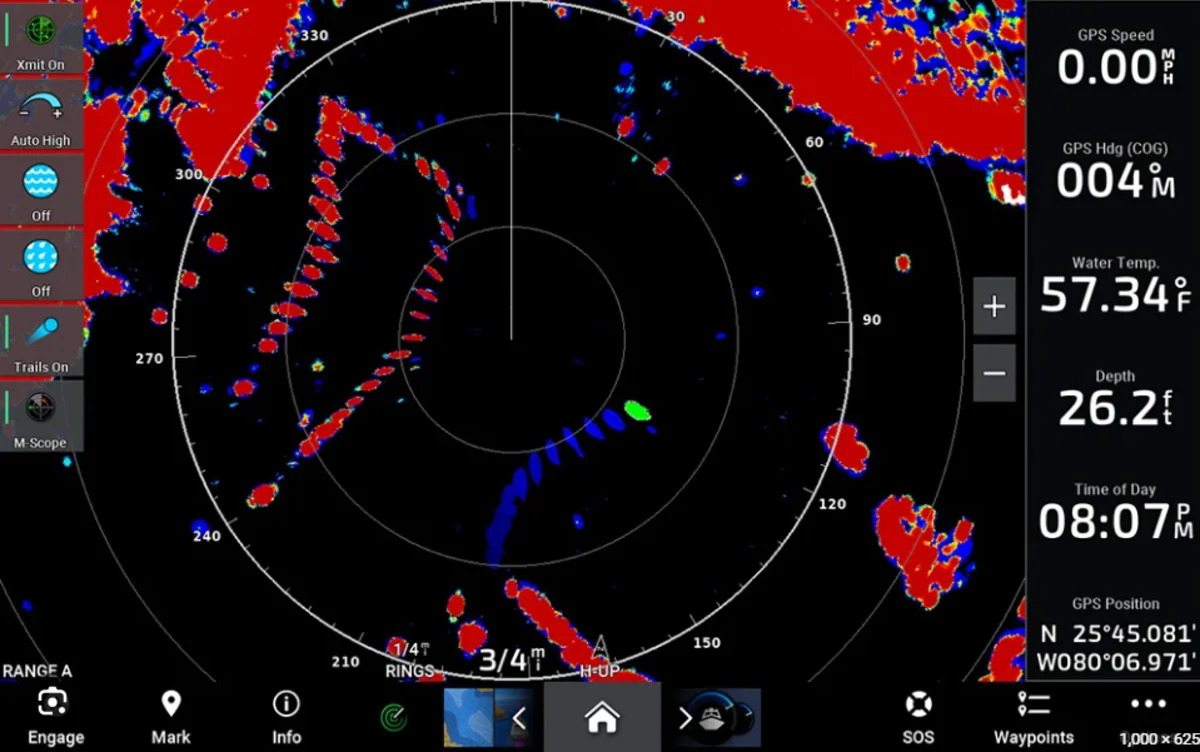
Run side by side on the same MFD, AIS and radar cross-check each other: AIS gives you identity and intent for anything transmitting, radar gives you a physical return for everything else, including the transmitting vessels themselves. A target that shows up on radar but never resolves into an AIS icon is worth watching more closely, not less.
One screen, three systems
The practical payoff of running all three on a modern MFD setup is that none of it requires a separate display. AIS targets overlay on the chart layer, radar overlays on the same chart or runs full-screen split, and the EPIRB sits off to the side as the one system that doesn’t need the MFD at all to do its job. If the helm is already built around a Garmin (or Simrad, Furuno, Raymarine) chartplotter network, adding AIS is usually the cheapest of the three to bolt on after the fact — it’s a single network device, not a new display or a dedicated antenna mount the way radar is.
Buying priorities if you’re building this out in pieces
Most boats don’t add all three at once. In order of what closes the biggest gap first:
- EPIRB or PLB — cheapest of the three, and the one piece of gear with no substitute if the boat is disabled or worse. If nothing else is on the boat yet, this is first.
- AIS transceiver — relatively inexpensive to add to an existing NMEA 2000 network, and directly addresses the highest-consequence collision risk (a ship many times your displacement) on the run out to the canyon.
- Radar — the most expensive and most involved install of the three, but it’s the only one of the three that still works when the threat isn’t transmitting anything at all.
Bottom line
None of these three substitutes for the others. EPIRB gets help coming when the boat can’t help itself, AIS tells you what’s sharing the shipping lane with you and tells the ships what’s sharing it with them, and radar sees everything else — squalls, debris, unlit boats — that never shows up on an AIS target list. Building the full stack piece by piece still beats skipping any one of them, and on a boat already running a networked MFD, AIS in particular is a smaller add than most people expect for what it covers.
This article may contain affiliate links. If you buy through them, we may earn a small commission at no extra cost to you. Learn more.