Marine Radar Setup Guide: Mounting, Wiring, and the Garmin GMR 18 HD3
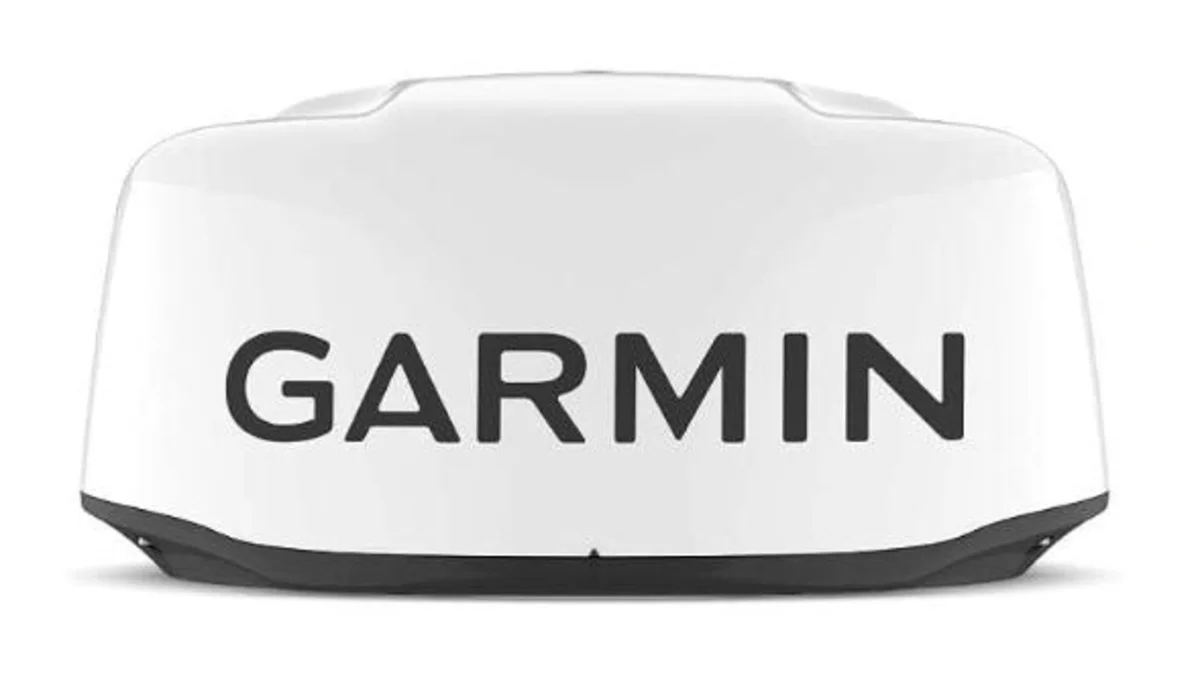
The boat tour mentions a Garmin GMR 18 HD3 radome up on the hardtop and moves on — it’s time to actually explain what that thing does and what goes into installing one. Radar gets treated as a “big boat” luxury item, but on a boat that runs offshore in the mid-Atlantic, it earns its keep two ways: it’s the only piece of electronics that tells you what’s out there when fog, rain, or full dark takes away visibility, and it’s a genuine fish-finding tool for spotting the rain squalls and bird activity that mark bait and current edges from miles farther out than your eyes can see.
What the GMR 18 HD3 actually is
| Spec | Value |
|---|---|
| Transmit power | 4 kW peak |
| Maximum range | 36 nautical miles |
| Minimum range | 20 meters (66 ft) — close-in target detail |
| Beam width | 5.2° horizontal, 25° vertical |
| Rotation speed | 24 RPM (fixed, low-noise) |
| Dimensions | 20” diameter, 9.8” high |
| Weight | 7 kg (15.4 lb) |
| Power input | 11–32 VDC |
| Power draw | 15 W standby, 40 W typical transmitting |
| Fuse | 7.5 A |
| Compass-safe distance | 1.2 m (3.9 ft) |
| Water rating | IPX7 |
| Connection | Garmin BlueNet / Garmin Marine Network |
| MARPA target tracking | Yes — requires a heading sensor (sold separately) |
It’s a magnetron dome radar — the traditional radar technology, as opposed to the solid-state broadband radars (like Garmin’s own Fantom line) that trade some raw range for faster target acquisition and no magnetron warm-up time. For a boat that mostly needs range, weather awareness, and reliable target detection at a sane price, a magnetron dome like this is still a completely reasonable choice, not a step down.
Where it can and can’t be mounted
This is the part that actually takes planning, straight from Garmin’s own install documentation. The radar has to be mounted above head height and out of range of people while transmitting — this isn’t a suggestion, it’s a hard safety requirement tied to RF exposure limits, and the radar automatically shuts off transmission if antenna rotation is ever obstructed. Beyond that:
- Higher is better. Mount it as high above the waterline as the boat reasonably allows, with minimal obstruction in the beam path — anything blocking the beam creates blind sectors or false echoes.
- Compass-safe distance matters. For the GMR 18 HD3 specifically, that’s 1.2 meters (3.9 ft) from any magnetic compass.
- Keep it away from other electronics. At least 2 m (6.5 ft) from other equipment and cables in the beam path, at least 1 m (40 in.) from any transmitting equipment or VHF cabling, and at least 2 m (6.5 ft) from SSB radios.
- GPS antennas go above or below the beam path — never level with it.
- Mount it at a different height than spreaders or crosstrees, and away from heat sources like exhaust stacks.
- Roof or hardtop mounts often need a riser. Garmin actually gives you the math for this:
(distance in mm from the mount to the nearest roof edge × 0.222) − 150 = minimum mounting height in mm. Skip this and the roof itself can reflect or absorb the beam, which is a worse problem on a metal hardtop than a fiberglass one.
Wiring: power and network, not NMEA 2000
This trips people up because so much of this site’s other electronics content is NMEA 2000-focused — the radar itself doesn’t talk over NMEA 2000. Data runs over Garmin’s BlueNet network (or the older Garmin Marine Network, with an adapter cable if that’s what the boat already has), the same layer covered in the marine Ethernet/BlueNet setup guide. Power is a completely separate run, straight from the battery through a dedicated in-line fuse — connecting the radar to power without that fuse in place voids the warranty outright, and it’s a real fire risk given the current involved, not just paperwork.
If the power run needs to be extended past the included cable length, the wire gauge has to scale with distance the same way it does everywhere else on the boat:
| Extension length | Minimum wire gauge |
|---|---|
| 2 m (6.5 ft) | 16 AWG |
| 4 m (13 ft) | 14 AWG |
| 6 m (19.5 ft) | 12 AWG |
Same voltage-drop logic as every other circuit on the boat — undersized wire on a long run means the radar sees reduced voltage exactly when you need full transmit power.
Overlay and MARPA both want a heading sensor
Two of the radar’s best features — overlaying the radar image directly on the chartplotter’s map, and MARPA (target tracking that helps flag other vessels for collision avoidance) — both list an optional heading sensor as a requirement for accurate results. Without one, the boat’s own magnetic compass (if it has any deviation at all, which most boats with an engine and electronics nearby do) introduces error into exactly the feature meant to keep the radar image aligned with reality. This is the direct, practical reason to pair a radar like this with something like the Garmin MSC 10 satellite compass already covered on this site — it’s not just an autopilot upgrade, it’s what makes radar overlay and MARPA trustworthy instead of approximately-right.
Once it’s wired up, there’s a one-time calibration worth doing: the front-of-boat offset. Take a compass bearing on a stationary target, compare it to what the radar shows for that same target, and if it’s off by more than a degree, correct it from the chartplotter (Options > Radar Setup > Installation > Front of Boat). Skipping this leaves every reading on the unit subtly rotated from reality.
Making sense of gain, sea filter, and clutter
Radar images get cluttered fast without some filtering, and the GMR 18 HD3 handles most of it automatically. Dynamic auto gain adjusts sensitivity on its own rather than requiring constant manual tuning, and the dynamic sea filter cuts down the near-boat clutter that wave action and sea spray throw back at the antenna — both matter more than people expect on a sloppy day, when a radar screen with no filtering turns into mostly noise close to the boat. Timed transmit mode is worth knowing about too: it lets you specify exact transmit windows to cut power consumption, useful on a boat running radar for hours at a stretch without wanting to burn through battery capacity for it.
Using radar to actually find fish
This is the part that doesn’t show up in Garmin’s own documentation but matters to exactly the audience reading this. Radar doesn’t see fish, but it sees two things that reliably mark where fish are: rain squalls and isolated weather cells, which concentrate bait and predators underneath them the same way a temperature break does, and bird activity, where a dense flock shows up as a return on the screen well before it’s visible to the eye — sometimes miles out.
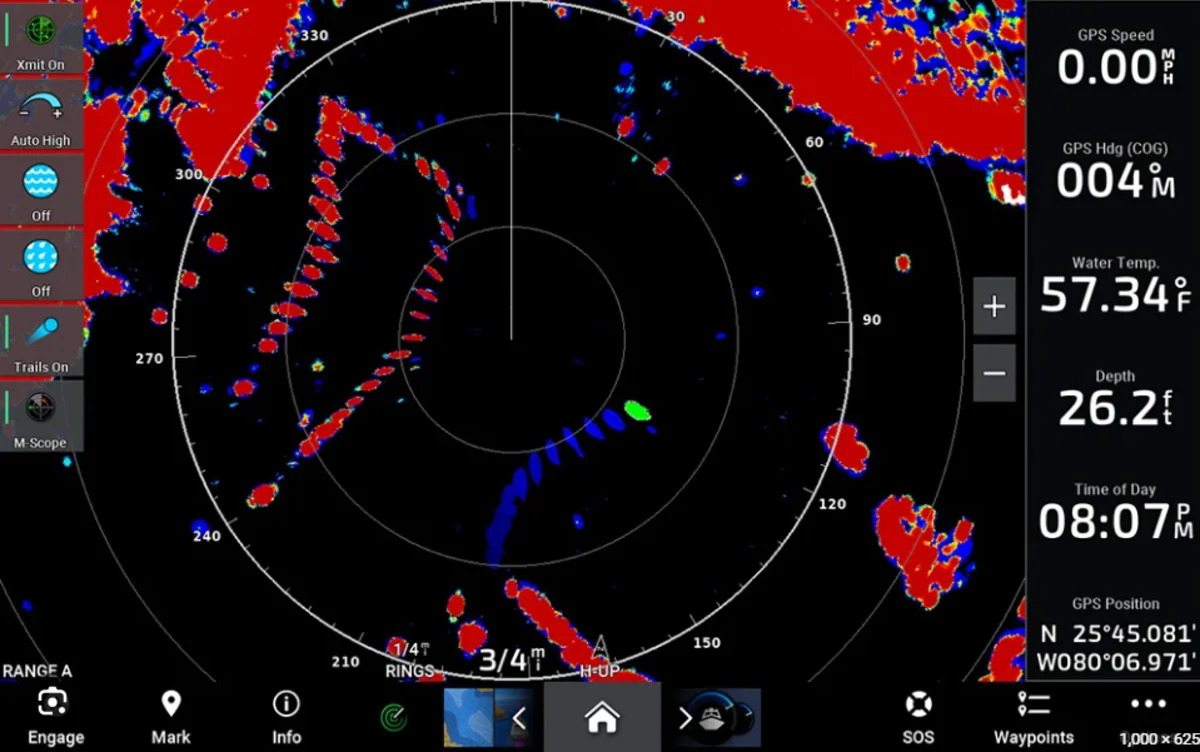
That heavy red-and-blue return isn’t clutter to tune out — it’s a real weather cell, and cells like this are exactly what’s worth running toward rather than around. A squall concentrates bait the same way a current edge does, and the radar screen shows it forming and moving well before it’s visible off the bow. Running radar alongside the SST and chlorophyll chart reading already covered on this site gives you two independent ways to find the same thing: temperature breaks from the satellite data, and the actual weather and bird activity riding on top of them in real time.
What to actually buy
The radar itself: the Garmin GMR 18 HD3 is the exact unit covered throughout this guide — a straightforward, well-reviewed 4kW dome radar at $1,799.99 that connects to any BlueNet or Marine Network-compatible Garmin chartplotter.
The heading sensor that makes overlay and MARPA worth using: see the MSC 10 satellite compass guide for the full case for pairing one with a radar install like this, not just an autopilot.
Bottom line
A magnetron dome radar like the GMR 18 HD3 isn’t complicated once it’s broken into its real pieces: mount it high, clear of people and other electronics, wire power and network as two separate runs with the correct fuse and wire gauge, and add a heading sensor if overlay and MARPA are actually going to get used rather than just switched on. Get the install right once and it becomes one of the more quietly useful pieces of gear on the boat — for running home in the fog and for finding the next school before anyone else on the water does.
This article may contain affiliate links. If you buy through them, we may earn a small commission at no extra cost to you. Learn more.